library(readr)
library(dplyr)
library(tidyr)
library(ggplot2)
library(kableExtra) # <- only for the presentation on the webpageRecap exercises: import, preparation and visualization
A possible solution
Exercise 1: Customer Satisfaction Tracking
For this exercise we need the following packages:
Since the csv file is in good shape we can just read it via data.table::fread() or, because it is already very clean, with readr::read_csv():
# Note: adjust to you project and best use here::here()
customers_data <- read_csv(
  file = "customer_satisfaction.csv")
This is how the current data looks like:
head(customers_data) |>
kable()| customer_id | account_age_months | q1_service_quality | q1_product_value | q2_service_quality | q2_product_value | q3_service_quality | q3_product_value |
|---|---|---|---|---|---|---|---|
| 1 | 12 | 3 | 5 | 4 | 2 | 5 | 3 |
| 2 | 25 | 4 | 1 | 4 | 4 | 5 | 3 |
| 3 | 34 | 4 | 5 | 2 | 3 | 5 | 5 |
| 4 | 20 | 1 | 5 | 5 | 5 | 3 | 5 |
| 5 | 16 | 3 | 1 | 2 | 5 | 5 | 5 |
| 6 | 13 | 5 | 1 | 5 | 4 | 4 | 4 |
To transform it into the desired long format we use tidyr::pivot_longer(). Here we can make our live easier by using the selection helper dplyr::starts_with() to capture all columns starting with q. But a simple application only brings us that far:
customers_data |>
  pivot_longer(
    cols = all_of(starts_with("q"))
    ) |>
  head() |>
kable()| customer_id | account_age_months | name | value |
|---|---|---|---|
| 1 | 12 | q1_service_quality | 3 |
| 1 | 12 | q1_product_value | 5 |
| 1 | 12 | q2_service_quality | 4 |
| 1 | 12 | q2_product_value | 2 |
| 1 | 12 | q3_service_quality | 5 |
| 1 | 12 | q3_product_value | 3 |
The column name still contains information about both the quarter and the metric. There are a number of ways we can separate this column.
One way would be to use the argument names_sep of pivot_longer() and then give two column names to names_to. This works in our case but note that it gives a warning that some parts of the column are dropped:
customers_long <- customers_data |>
  pivot_longer(
    cols = starts_with("q"),
    names_sep = "_",
    names_to = c("quarter", "metric")
    )
Warning: Expected 2 pieces. Additional pieces discarded in 6 rows [1, 2, 3, 4,
5, 6].head(customers_long)# A tibble: 6 × 5
customer_id account_age_months quarter metric value
<dbl> <dbl> <chr> <chr> <dbl>
1 1 12 q1 service 3
2 1 12 q1 product 5
3 1 12 q2 service 4
4 1 12 q2 product 2
5 1 12 q3 service 5
6 1 12 q3 product 3This is because we are telling the function to separate the column using the token _, but this token appears more than once (but we only provide two column names). In our case this is save to ignore, but when you want to avoid it, you can use the function dplyr::separate_wider_delim(), which allows for more sophisticate separation procedures. In our case, we can set too_many = "merge", which tells the function to only split on the first underscore and merge everything else together:
customers_long <- customers_data |>
  pivot_longer(
    cols = starts_with("q"),
    names_to = "full_name",
    values_to = "rating"
  ) |>
  separate_wider_delim(
    cols = full_name,
    delim = "_",
    names = c("quarter", "metric"),
    too_many = "merge")

head(customers_long) |>
kable()| customer_id | account_age_months | quarter | metric | rating |
|---|---|---|---|---|
| 1 | 12 | q1 | service_quality | 3 |
| 1 | 12 | q1 | product_value | 5 |
| 1 | 12 | q2 | service_quality | 4 |
| 1 | 12 | q2 | product_value | 2 |
| 1 | 12 | q3 | service_quality | 5 |
| 1 | 12 | q3 | product_value | 3 |
Next we need to compute average ratings for each combination of quarter and metric type:
satisfaction_summary <- customers_long |>
  group_by(quarter, metric) |>
  summarise(avg_rating = mean(rating), .groups = "drop")

kable(satisfaction_summary)| quarter | metric | avg_rating |
|---|---|---|
| q1 | product_value | 2.90 |
| q1 | service_quality | 3.10 |
| q2 | product_value | 3.52 |
| q2 | service_quality | 3.44 |
| q3 | product_value | 3.98 |
| q3 | service_quality | 4.14 |
Note: there are different ways of doing this. Instead of the more explicit
group_by()you could have usedsummarize(..., .by=c()).
The final step is then to create the visualization using ggplot2. The only thing to note is that we need to be explicit regarding the grouping and set
ggplot(
  data = satisfaction_summary,
  mapping = aes(
    x = quarter,
    y = avg_rating,
    colour = metric,
    group = metric)
  ) +
  geom_point() +
  geom_line() +
  theme_light()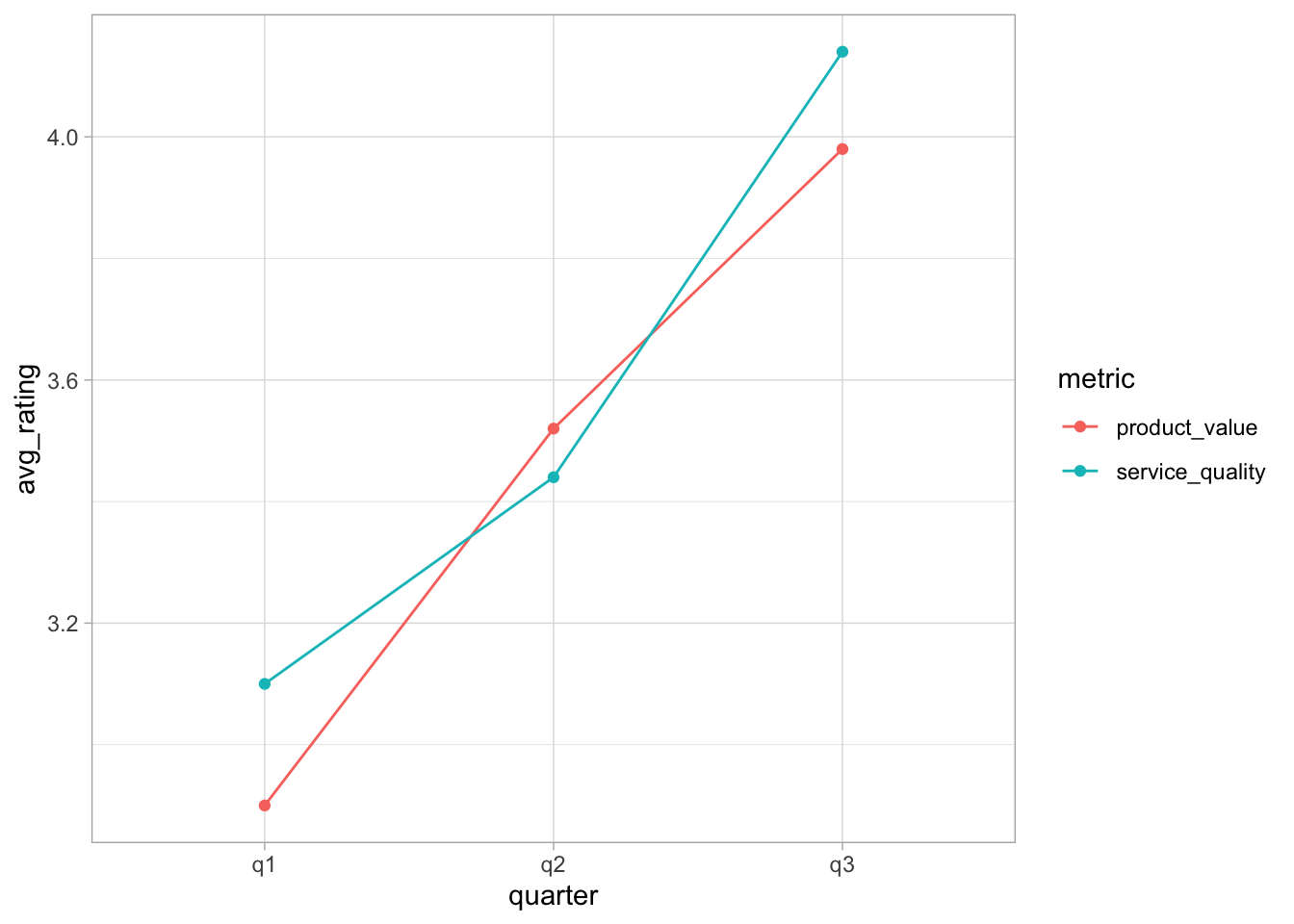
TipWhy do we need
group = metric?
When you use geom_line(), ggplot2 needs to know which points to connect. By default, ggplot2 automatically creates groups based on the combination of all discrete variables in your data. In our case these are the two variables quarter and metric.
So ggplot2 creates groups based on the combination of both these variables:
q1 + product_value(1 point)q1 + service_quality(1 point)q2 + product_value(1 point)q2 + service_quality(1 point)q3 + product_value(1 point)q3 + service_quality(1 point)
Each group has only one observation, so there’s nothing to connect with a line!
What we actually want is to have separate lines for each metric, i.e. one line for product_value across all quarters and one line for service_quality across all quarters.
So you need to tell ggplot2: “Group by metric only, not by the combination of all discrete variables, which would be quarter and metric!”
Of course, there are many ways to make the plot pretties, but here we may leave it at this!
To also complete the bonus challenge, we need to compute the improvement after the intervention, i.e. from q1 to the other two quarters. We will do this by computer the average for q2 and q3, compute the relative change to q1 and then rank the data according to their relative changes.
Here are all steps conducted separately: first, create a new variable to group periods before and after the intervention:
step1 <- satisfaction_summary |>
  mutate(
    intervention = ifelse(test = quarter=="q1", yes = "No", no = "Yes")
    )
kable(step1)| quarter | metric | avg_rating | intervention |
|---|---|---|---|
| q1 | product_value | 2.90 | No |
| q1 | service_quality | 3.10 | No |
| q2 | product_value | 3.52 | Yes |
| q2 | service_quality | 3.44 | Yes |
| q3 | product_value | 3.98 | Yes |
| q3 | service_quality | 4.14 | Yes |
Now compute the respective averages:
step2 <- step1 |>
  summarise(
    avg_rating = mean(avg_rating), .by = c("intervention", "metric")
    )
kable(step2)| intervention | metric | avg_rating |
|---|---|---|
| No | product_value | 2.90 |
| No | service_quality | 3.10 |
| Yes | product_value | 3.75 |
| Yes | service_quality | 3.79 |
Make it wider:
step3 <- step2 |>
  pivot_wider(names_from = intervention, values_from = avg_rating)
kable(step3)| metric | No | Yes |
|---|---|---|
| product_value | 2.9 | 3.75 |
| service_quality | 3.1 | 3.79 |
And now compute the relative change:
step4 <- step3 |>
  mutate(
    absolute_change = Yes - No,
    relative_change = (absolute_change / No)*100
    ) |>
  select(-No, -Yes)
kable(step4)| metric | absolute_change | relative_change |
|---|---|---|
| product_value | 0.85 | 29.31034 |
| service_quality | 0.69 | 22.25806 |
Or, all in one call:
satisfaction_summary |>
  mutate(
    intervention = ifelse(test = quarter=="q1", yes = "No", no = "Yes")
    ) |>
  summarise(
    avg_rating = mean(avg_rating), .by = c("intervention", "metric")
  ) |>
  pivot_wider(names_from = intervention, values_from = avg_rating) |>
  mutate(
    absolute_change = Yes - No,
    relative_change = (absolute_change / No)*100
    ) |>
  select(-No, -Yes) |>
kable()| metric | absolute_change | relative_change |
|---|---|---|
| product_value | 0.85 | 29.31034 |
| service_quality | 0.69 | 22.25806 |
Exercise 2: Pricing Strategy Analysis
For this exercise we need the following packages:
library(readr)
library(dplyr)
library(tidyr)
library(ggplot2)
library(kableExtra) # <- only for the presentation on the webpage
Since the csv file is in good shape we can just read it via data.table::fread() or, because it is already very clean, with readr::read_csv():
# Note: adjust to you project and best use here::here()
pricing_data <- read_csv(
  file = "pricing_experiment.csv")
This is how the current data looks like:
head(pricing_data) |>
kable()| product_id | trial_number | pricing_strategy | conversion_rate | avg_transaction_value |
|---|---|---|---|---|
| 1 | 1 | standard | 0.2196469 | 74.61481 |
| 1 | 2 | standard | 0.1786139 | 68.50374 |
| 1 | 3 | standard | 0.1726851 | 70.15176 |
| 1 | 1 | discount_10 | 0.2051315 | 86.48867 |
| 1 | 2 | discount_10 | 0.2219469 | 65.79471 |
| 1 | 3 | discount_10 | 0.1923106 | 94.04643 |
To compute mean conversion rates and transaction values across trials for each product and pricing strategy, we group the data for products and pricing strategies:
product_averages <- pricing_data |>
  group_by(product_id, pricing_strategy) |>
  summarise(
    conversion_rate = mean(conversion_rate),
    transaction_value = mean(avg_transaction_value),
    .groups = "drop"
    )

head(product_averages) |>
kable()| product_id | pricing_strategy | conversion_rate | transaction_value |
|---|---|---|---|
| 1 | discount_10 | 0.2064630 | 82.10994 |
| 1 | premium | 0.2215509 | 85.57820 |
| 1 | standard | 0.1903153 | 71.09011 |
| 2 | discount_10 | 0.1798765 | 87.74333 |
| 2 | premium | 0.1865313 | 83.22130 |
| 2 | standard | 0.1988115 | 86.61588 |
The next task asks us to transform the data so that each row is one product and the pricing strategies become separate columns for both conversion_rate and avg_transaction_value, but with column names combining the information on the metric and pricing strategy.
That means we need to make the data wider, and use the argument names_sep to introduce a separator into the new column names:
product_wide <- product_averages |>
  pivot_wider(
    id_cols = product_id,
    names_from = pricing_strategy,
    values_from = c(conversion_rate, transaction_value),
    names_sep = "_"
  )

head(product_wide) |>
kable()| product_id | conversion_rate_discount_10 | conversion_rate_premium | conversion_rate_standard | transaction_value_discount_10 | transaction_value_premium | transaction_value_standard |
|---|---|---|---|---|---|---|
| 1 | 0.2064630 | 0.2215509 | 0.1903153 | 82.10994 | 85.57820 | 71.09011 |
| 2 | 0.1798765 | 0.1865313 | 0.1988115 | 87.74333 | 83.22130 | 86.61588 |
| 3 | 0.2228304 | 0.1969064 | 0.2065927 | 71.98334 | 93.06214 | 87.98963 |
| 4 | 0.1818890 | 0.1910592 | 0.1884318 | 87.94258 | 96.17300 | 80.88020 |
| 5 | 0.1913803 | 0.2032807 | 0.2254633 | 87.26717 | 86.70312 | 86.14059 |
| 6 | 0.1917669 | 0.2158156 | 0.2073016 | 82.09762 | 73.18594 | 82.89268 |
We now need to compute expected revenue per customer by multiplying conversion rates and average transaction values for each pricing strategy:
expected_revs <- product_wide |>
  mutate(
    standard_revenue = conversion_rate_standard * transaction_value_standard,
    discount_10_revenue = conversion_rate_discount_10 * transaction_value_discount_10,
    premium_revenue = conversion_rate_premium * transaction_value_premium
  )

head(expected_revs) |>
kable()| product_id | conversion_rate_discount_10 | conversion_rate_premium | conversion_rate_standard | transaction_value_discount_10 | transaction_value_premium | transaction_value_standard | standard_revenue | discount_10_revenue | premium_revenue |
|---|---|---|---|---|---|---|---|---|---|
| 1 | 0.2064630 | 0.2215509 | 0.1903153 | 82.10994 | 85.57820 | 71.09011 | 13.52954 | 16.95266 | 18.95992 |
| 2 | 0.1798765 | 0.1865313 | 0.1988115 | 87.74333 | 83.22130 | 86.61588 | 17.22023 | 15.78296 | 15.52338 |
| 3 | 0.2228304 | 0.1969064 | 0.2065927 | 71.98334 | 93.06214 | 87.98963 | 18.17801 | 16.04007 | 18.32453 |
| 4 | 0.1818890 | 0.1910592 | 0.1884318 | 87.94258 | 96.17300 | 80.88020 | 15.24040 | 15.99579 | 18.37474 |
| 5 | 0.1913803 | 0.2032807 | 0.2254633 | 87.26717 | 86.70312 | 86.14059 | 19.42155 | 16.70121 | 17.62507 |
| 6 | 0.1917669 | 0.2158156 | 0.2073016 | 82.09762 | 73.18594 | 82.89268 | 17.18379 | 15.74361 | 15.79467 |
This tells you the expected revenue from each pricing approach.
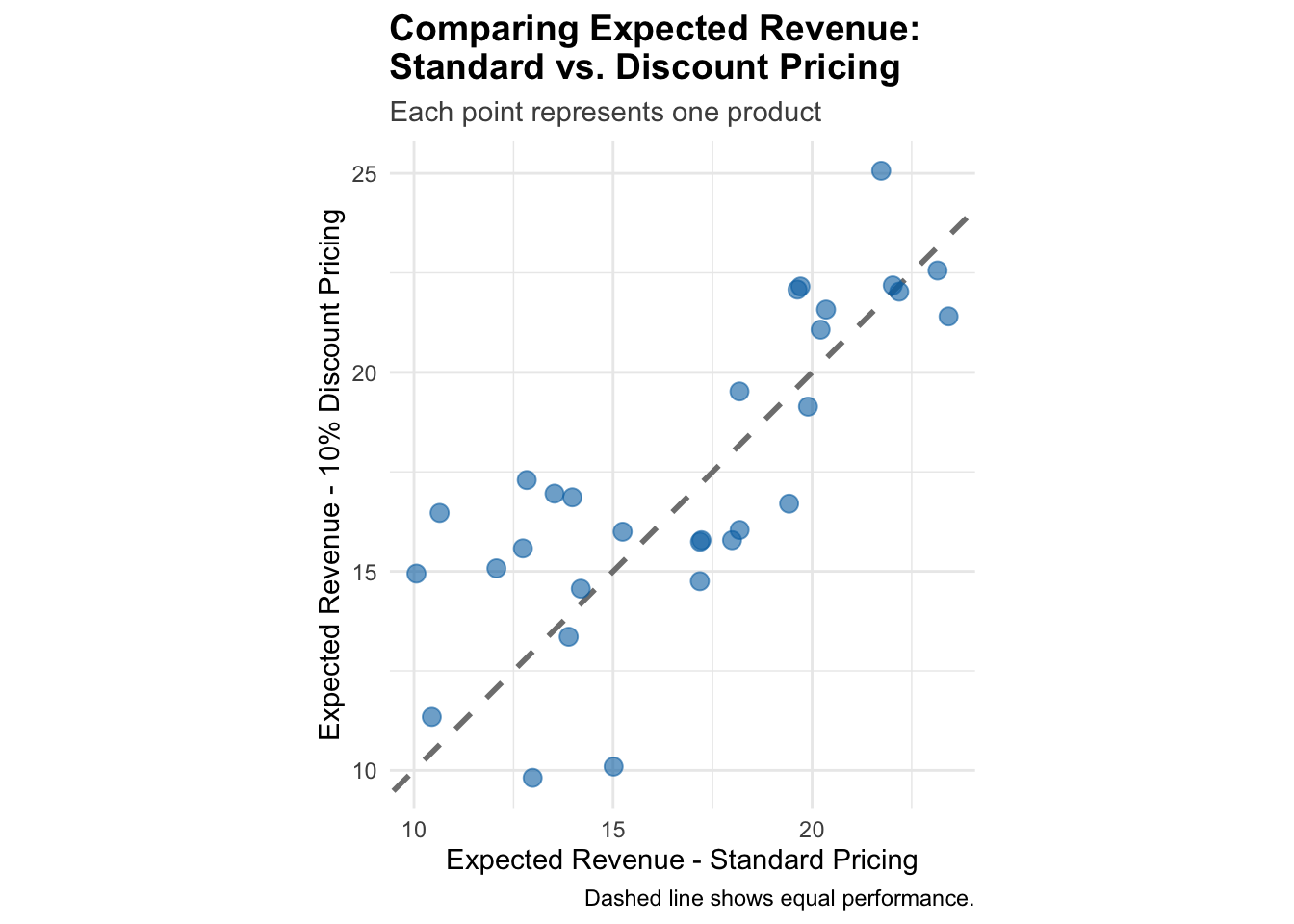
Finally, we want a scatter plot that compares the pricing strategies for each product, illustrating whether the same pricing strategy is the best for each product. To this end we create the scatter plot with expected revenues for standard and discount pricing on the x and y axis, and add a diagonal reference line. If all points are above (below) the reference line, discount (standard) pricing is always better:
ggplot(
  data = expected_revs,
  mapping = aes(
    x = standard_revenue,
    y = discount_10_revenue)
  ) +
  geom_abline(
    intercept = 0, slope = 1, linetype = "dashed",
    color = "gray50", linewidth = 1
    ) +
  geom_point(size = 3, alpha = 0.6, color = "#0072B2") +
  labs(
    title = "Comparing Expected Revenue: \nStandard vs. Discount Pricing",
    subtitle = "Each point represents one product",
    x = "Expected Revenue - Standard Pricing",
    y = "Expected Revenue - 10% Discount Pricing",
    caption = "Dashed line shows equal performance."
  ) +
  theme_minimal() +
  theme(
    plot.title = element_text(face = "bold", size = 14),
    plot.subtitle = element_text(size = 11, color = "gray30")
  ) +
  coord_fixed(ratio = 1)  # Makes comparison easier